1.3.3.5. Specialized Directives
This is a directive that identifies the author of the current section. The argument should include the author’s name such that it can be used for presentation and email address. The domain name portion of the address should be lower case.
By default, this markup isn’t reflected in the output in any way (it helps keep track of contributions), but you can set the configuration value
show_authorsto True to make them produce a paragraph in the output.Syntax:
.. sectionauthor:: Last, First <username@domain.com>Rendered: N/A
This directive is the codeauthor directive, which can appear multiple times, names the authors of the described code, just like
sectionauthornames the author(s) of a piece of documentation. It too only produces output if theshow_authorsconfiguration value is True.Syntax:
.. codeauthor:: Last, First <username@domain.com>Rendered: N/A
The glossary directive is for defining terms and is used in
/source/common_docs/acronym_list.rst(Example taken from there)Syntax:
.. glossary::

    ACI
        Application Centric Infrastructure (Cisco product)
:term:`ACI` (To just display the term and link it) :term:`Application Centric Infrastructure<ACI>` (To just display the term with Alternate text and link it)
Rendered:
or
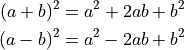
The math directive for displayed math (math takes whole line). This also supports multiple equations, labeling the equation and then referencing with auto-numbering it inline with text.
This directive is for documenting footnotes.
Note
You can also explicitly number the footnotes (
[1]_) or use auto-numbered footnotes without names ([#]_).Syntax:
At text that requires a footnote:
Text that requires a footnote [#]_.At bottom of page or desired location of footnotes:
.. rubric:: Footnotes:

.. [#] Text of first footnote.
Rendered:
At text that requires a footnote: Text that requires a footnote [1].
See left bottom of page:
Footnotes
This directive is for documenting Citation references, usually at bottom of page.
Syntax:
See :cite:`small` for citation example inline with text or paragraph and reference is shown at end of document in REFERENCES section.
See :footcite:`small` for citation example inline with text or paragraph and reference is shown in footnote of page by using.
the .. footbibliography:: directive within page
.. bibliography::
    :cited: #Only cited references will be listed, default
    :all: #All references will be listed. used in the place of cited
    :style: #[alpha, plain, unsrt, usrtalpha]
    :list: enumerated #[bullet, enumerated]
    :enumtype: upperroman #[arabic, loweralpha, upperalpha, lowerroman, upperroman]
    :start: 3 #Any positive integer or continue to continue from last bibliography directive
    :labelprefix: A #individual labels for bibliographies
    :keyprefix: a- #f you have multiple bibliographies, and you would like entries to be repeated in different documents, then use the keyprefix option.
    :filter: author % "Einstein" #A Valid python expression
You could also separate your citations between articles and books in different and multiple bib files:
.. rubric:: Articles

.. bibliography:: articles.bib

.. rubric:: Books

.. bibliography:: books1.bib books2.bib
Rendered:
See [Jas91] for citation example inline with text or paragraph and reference is shown at end of document in REFERENCES section.
See [2] for citation example inline with text or paragraph and reference is shown in footnote of page by using. the
.. footbibliography::directive within page. A footcite’s references will only appear in footer where called for first instance and will not appear in REFERENCES sections.
This directive is for documenting todo references.
Syntax:
Directive to create a todo list in document that appears as a row of Orange note blocks labeled as Todo with a link and location of all todo’s
**TODO List**

.. todolist::
Directive to mark a todo in document that will appear in list and create a Orange note block labeled as Todo
(TODO - | FIXME - | BUG -) The tag with with the previous tags in front of this text is not required for the directive, it simply identifies the type and depending on your text editor using :program:`Microsoft VS Code` with an extension like Todo Tree List it will set a tag for highlights and tracking.
Rendered:
Directive to create a todo list in document that appears as a row of Orange note blocks labeled as Todo with a link and location of all todo’s
TODO List
Todo
TODO - Demonstration todo 1
Todo
FIXME - Demonstration todo 2
Todo
BUG - Demonstration todo 3
Directive to mark a todo in document that will appear in list and create a Orange note block labeled as TODO
Todo
TODO - Demonstration todo 1
Todo
FIXME - Demonstration todo 2
Todo
BUG - Demonstration todo 3
This directive is used for a concise titled paragraph, within its own box.
Note
The
.. topic::role cannot be used within topics or body elements like lists or tables.Syntax:
.. topic:: Your Topic Title

    Subsequent indented lines comprise
    the body of the topic, and are
    interpreted as body elements.
Rendered (Untabbed due to limitation):