1.3.3.8.2. blockdiag Directive - Activity Diagram
Requirements:
Install:
sphinxcontrib-actdiagvia Python pip (Included in SPHINX_ENV_INSTALL, Sphinx Environment)Add
sphinxcontrib.actdiagto Sphinx extentions in conf.py (Included in SPHINX_ENV_INSTALL, Sphinx Environment via defaults.py)
This is your .rst file code example to create a Activity Diagram http://blockdiag.com/en/actdiag/index.html:
Option |
Values |
|---|---|
:align: |
left, center or right |
:scale: |
0-100 percentage value |
:caption: |
text to label Figure |
:name: |
text to create hyperlink for sphinx (no spaces) |
:desctable: |
Adds description table as shown in example. (no spaces in labels) |
.. actdiag::
    :align: center
    :caption: Example - Activity Diagram
    :name: triton_coe_test_actdiag
    :scale: 100
    :desctable:

    actdiag {
        Level-1 ->  Level-2 ->  Level-3;
                    Level-2 ->              Req-Verify;
                                Level-3 ->  Req-Verify;
        lane COE {
            Level-1 [description = "Integration in Lab 9"];
        }
        lane IPT {
            Level-2 [description = "Qualification in Lab 10 West"];
            Level-3 [description = "Certification in Triton System Center (TSC)"];
        }
        lane Program {
            Req-Verify [description = "Requirements Verification"];
        }
    }
The previous code-block will generate this Activity Diagram:
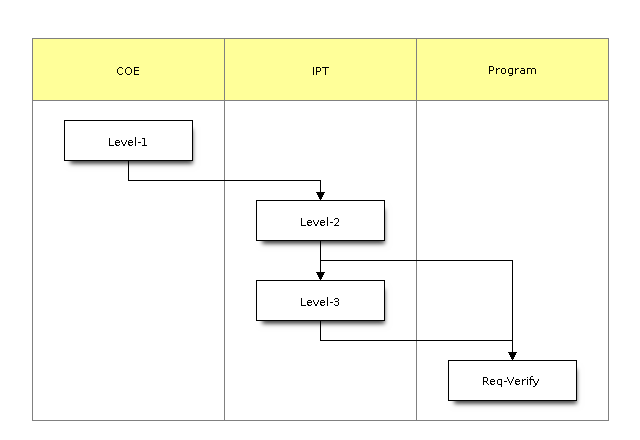
Figure 1.3 Example - Activity Diagram
Name |
Description |
|---|---|
Level-1 |
Integration in Lab 9 |
Level-2 |
Qualification in Lab 10 West |
Level-3 |
Certification in Triton System Center (TSC) |
Req-Verify |
Requirements Verification |