1.3.3.11. Sphinx Diagram Directives (Mermaid Diagrams)
Requirements:
Install: mermaid-python via Python pip
Install:
sphinxcontrib-mermaidextension via Python pipAdd
sphinxcontrib-mermaidto Sphinx extensions in conf.py (Included in SPHINX_ENV_INSTALL, Sphinx Environment via defaults.py)Configure extension in ‘conf.py’ like shown below:
# sphinxcontrib.mermaid configuration settings
mermaid_enable = True
mermaid_output_format = "raw"  # svg, png, pdf
mermaid_latex_output_format = "pdf"  # pdf is the only option for LaTeX
mermaid_default_export_scale = 75  # Default scale for exported diagrams
mermaid_include_elk = "0.1.4" #Include ELK for layout algorithms
mermaid_cmd = "npx mmdc"
mermaid_d3_zoom = True  # Enable D3 zoom functionality for Mermaid diagrams
Flow Diagram
Syntax
.. mermaid::
    :name: flowchart_example
    :align: center
    :caption: flowchart_example

    flowchart TD
        A[Christmas] -->|Get money| B(Go shopping)
        B --> C{Let me think}
        C -->|One| D[Laptop]
        C -->|Two| E[iPhone]
        C -->|Three| F[fa:fa-car Car]
Rendered
![flowchart TD
A[Christmas] -->|Get money| B(Go shopping)
B --> C{Let me think}
C -->|One| D[Laptop]
C -->|Two| E[iPhone]
C -->|Three| F[fa:fa-car Car]](../../../../../_images/mermaid-4aa043e83e8cd9fa8fa09ea723853666a922a262.png)
Figure 1.21 flowchart_example
Sequence Diagram
Syntax
.. mermaid::
    :name: sequence_diagram_example
    :align: center
    :caption: sequence_diagram_example

    sequenceDiagram
        Alice->>+John: Hello John, how are you?
        Alice->>+John: John, can you hear me?
        John-->>-Alice: Hi Alice, I can hear you!
        John-->>-Alice: I feel great!
Rendered
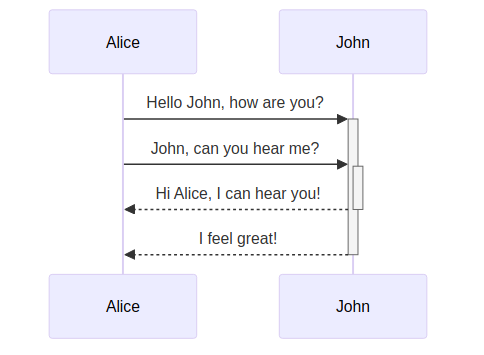
Figure 1.22 sequence_diagram_example
Class Diagram
Syntax
.. mermaid::
    :name: class_diagram_example
    :align: center
    :caption: class_diagram_example

    classDiagram
        Animal <|-- Duck
        Animal <|-- Fish
        Animal <|-- Zebra
        Animal : +int age
        Animal : +String gender
        Animal: +isMammal()
        Animal: +mate()
        class Duck{
        +String beakColor
        +swim()
        +quack()
        }
        class Fish{
        -int sizeInFeet
        -canEat()
        }
        class Zebra{
        +bool is_wild
        +run()
        }
Rendered
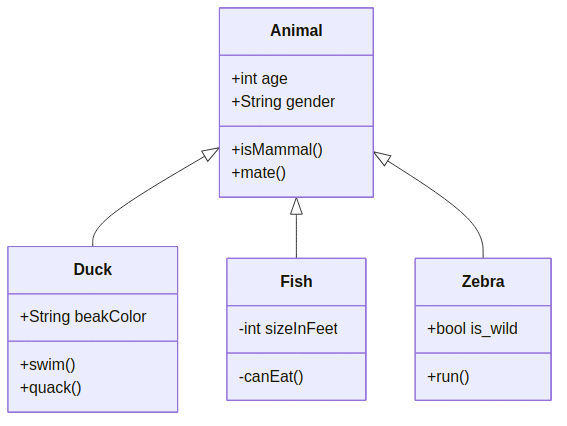
Figure 1.23 class_diagram_example
State Diagram
Syntax
.. mermaid::
    :name: state_diagram_example
    :align: center
    :caption: state_diagram_example

    stateDiagram-v2
        [*] --> Still
        Still --> [*]
        Still --> Moving
        Moving --> Still
        Moving --> Crash
        Crash --> [*]
Rendered
![stateDiagram-v2
[*] --> Still
Still --> [*]
Still --> Moving
Moving --> Still
Moving --> Crash
Crash --> [*]](../../../../../_images/mermaid-1150c1ac7af6da4d2890d24d7afdb7a5b440482a.png)
Figure 1.24 state_diagram_example
ER Diagram
Syntax
.. mermaid::
    :name: er_diagram_example
    :align: center
    :caption: er_diagram_example

    erDiagram
        CUSTOMER }|..|{ DELIVERY-ADDRESS : has
        CUSTOMER ||--o{ ORDER : places
        CUSTOMER ||--o{ INVOICE : "liable for"
        DELIVERY-ADDRESS ||--o{ ORDER : receives
        INVOICE ||--|{ ORDER : covers
        ORDER ||--|{ ORDER-ITEM : includes
        PRODUCT-CATEGORY ||--|{ PRODUCT : contains
        PRODUCT ||--o{ ORDER-ITEM : "ordered in"
Rendered
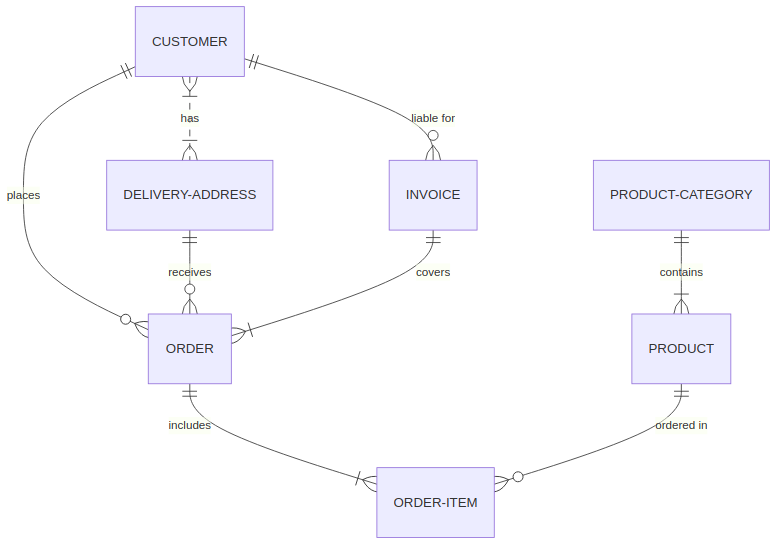
Figure 1.25 er_diagram_example
Gantt Chart
Syntax
.. mermaid::
    :name: gantt_chart_example
    :align: center
    :caption: gantt_chart_example

    gantt
        title A Gantt Diagram
        dateFormat  YYYY-MM-DD
        section Section
        A task           :a1, 2014-01-01, 30d
        Another task     :after a1  , 20d
        section Another
        Task in sec      :2014-01-12  , 12d
        another task      : 24d
Rendered
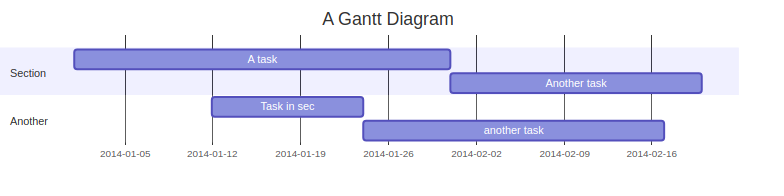
Figure 1.26 gantt_chart_example
Requirement Diagram
Journey Diagram
Syntax
.. mermaid::
    :name: journey_diagram_example
    :align: center
    :caption: journey_diagram_example

    journey
        title My working day
        section Go to work
        Make tea: 5: Me
        Go upstairs: 3: Me
        Do work: 1: Me, Cat
        section Go home
        Go downstairs: 5: Me
        Sit down: 3: Me
Rendered
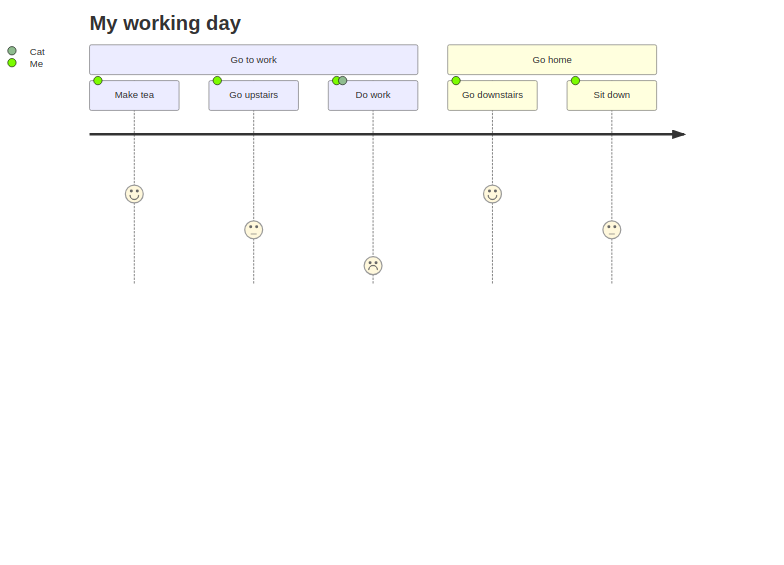
Figure 1.27 journey_diagram_example
Git Graph
Syntax
.. mermaid::
    :name: git_graph_example
    :align: center
    :caption: git_graph_example

    gitGraph
        commit
        commit
        branch develop
        checkout develop
        commit
        commit
        checkout main
        merge develop
        commit
        commit
Rendered
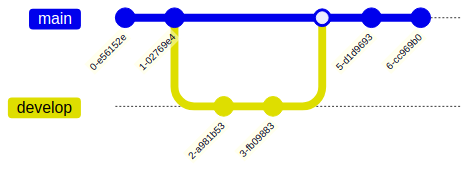
Figure 1.28 git_graph_example
Pie Chart
Syntax
.. mermaid::
    :name: pie_chart_example
    :align: center
    :caption: pie_chart_example

    pie title Pets adopted by volunteers
        "Dogs" : 386
        "Cats" : 85
        "Rats" : 15
Rendered
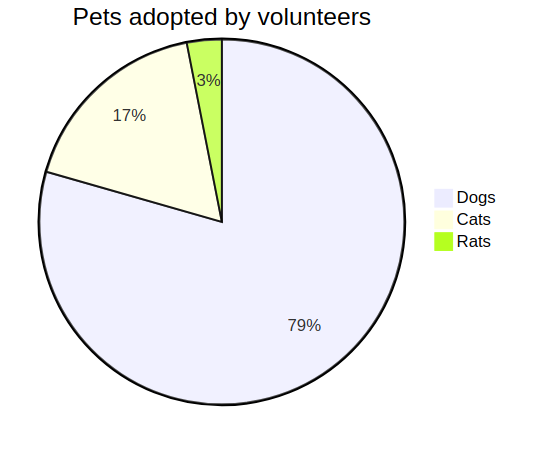
Figure 1.29 pie_chart_example
Mind Map
Syntax
.. mermaid::
    :name: mind_map_example
    :align: center
    :caption: mind_map_example

    mindmap
    root((mindmap))
        Origins
        Long history
        ::icon(fa fa-book)
        Popularisation
            British popular psychology author Tony Buzan
        Research
        On effectiveness<br/>and features
        On Automatic creation
            Uses
                Creative techniques
                Strategic planning
                Argument mapping
        Tools
        Pen and paper
        Mermaid
Rendered
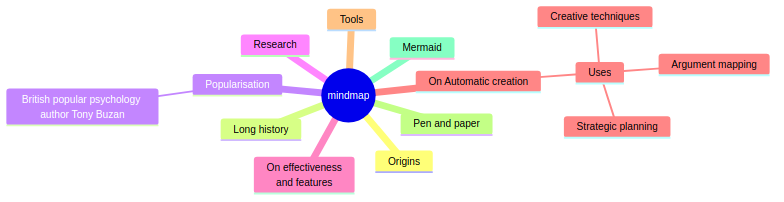
Figure 1.30 mind_map_example
Quadrant Chart
Syntax
.. mermaid::
    :name: quadrant_chart_example
    :align: center
    :caption: quadrant_chart_example

quadrantChart
    title Reach and engagement of campaigns
    x-axis Low Reach --> High Reach
    y-axis Low Engagement --> High Engagement
    quadrant-1 We should expand
    quadrant-2 Need to promote
    quadrant-3 Re-evaluate
    quadrant-4 May be improved
    Campaign A: [0.3, 0.6]
    Campaign B: [0.45, 0.23]
    Campaign C: [0.57, 0.69]
    Campaign D: [0.78, 0.34]
    Campaign E: [0.40, 0.34]
    Campaign F: [0.35, 0.78]
Rendered
![quadrantChart
title Reach and engagement of campaigns
x-axis Low Reach --> High Reach
y-axis Low Engagement --> High Engagement
quadrant-1 We should expand
quadrant-2 Need to promote
quadrant-3 Re-evaluate
quadrant-4 May be improved
Campaign A: [0.3, 0.6]
Campaign B: [0.45, 0.23]
Campaign C: [0.57, 0.69]
Campaign D: [0.78, 0.34]
Campaign E: [0.40, 0.34]
Campaign F: [0.35, 0.78]](../../../../../_images/mermaid-ee12093d90eff3df6738edbafe01c8319d68211b.png)
Figure 1.31 quadrant_chart_example
Packet
Syntax
.. mermaid::
    :name: packet_example
    :align: center
    :caption: packet_example

    ---
    title: "TCP Packet"
    ---
    packet-beta
    0-15: "Source Port"
    16-31: "Destination Port"
    32-63: "Sequence Number"
    64-95: "Acknowledgment Number"
    96-99: "Data Offset"
    100-105: "Reserved"
    106: "URG"
    107: "ACK"
    108: "PSH"
    109: "RST"
    110: "SYN"
    111: "FIN"
    112-127: "Window"
    128-143: "Checksum"
    144-159: "Urgent Pointer"
    160-191: "(Options and Padding)"
    192-255: "Data (variable length)"
Rendered
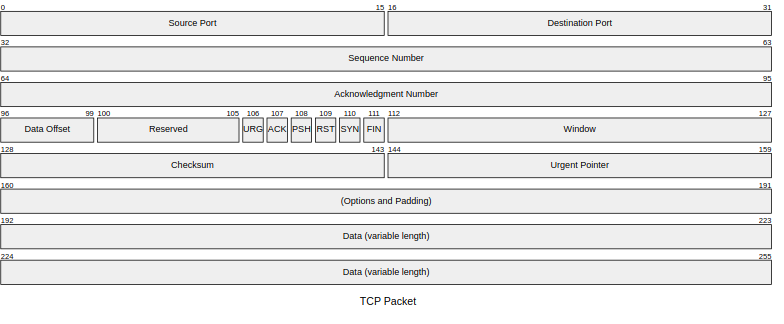
Figure 1.32 packet_example