1.3.3.8.6. blockdiag Directive - Rack Diagram
Requirements:
Install:
sphinxcontrib-nwdiagvia Python pip (Included in SPHINX_ENV_INSTALL, Sphinx Environment)Add
sphinxcontrib.rackdiagto Sphinx extentions in conf.py (Included in SPHINX_ENV_INSTALL, Sphinx Environment via defaults.py)
This is your .rst file code example to create a Rack Diagram http://blockdiag.com/en/nwdiag/index.html:
Note
The rackdiag extension via the nwdiag extention details how to create multiple racks in same diagram but that functionality is not currently working in Sphinx. It is also permissiable to create racks of 42U or 48U but they get very large on printouts.
Option |
Values |
|---|---|
:align: |
left, center or right |
:scale: |
0-100 percentage value |
:caption: |
text to label Figure |
:name: |
text to create hyperlink for sphinx (no spaces) |
.. rackdiag::
    :align: center
    :caption: Example - Rack Diagram
    :name: triton_coe_test_rackdiag
    :scale: 80

    rackdiag {
        16U;
        description = "Example Rack 01";
        1: UPS [2U];
        3: Database Server
        4: Web Server 01
        5: Web Server 02
        6: 1553 Coupler A
        6: 1553 Coupler B
        7: N/A [3U];
        10: Router
    }
The previous code-block will generate this Rack Diagram:
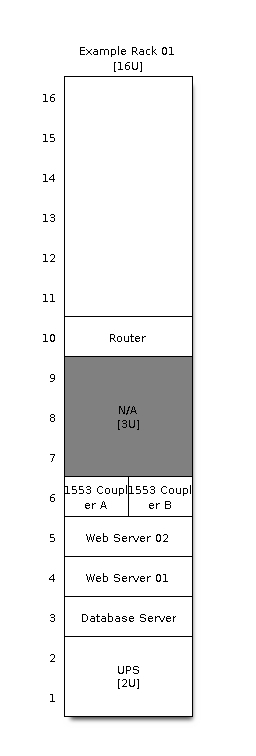
Figure 1.7 Example - Rack Diagram